

List & Label Reporting Tool for Software Developers
Transform Reporting Into an Advantage for Your Application
Embedded reporting with List & Label provides you with comprehensive reporting functions for your desktop, web and cloud applications with just a few lines of code. This leaves you more resources for the essentials: your application.
Design reports, data analyses and dashboards in just a few minutes, or let your users do it themselves. Select any development environment and data source you want.
Voted Best Reporting Tool for .NET by Visual Studio Magazine Readers
Gold in the category Reporting, Analysis and Visualization

Silver in the category Charts, Gauges, Graph and Flow
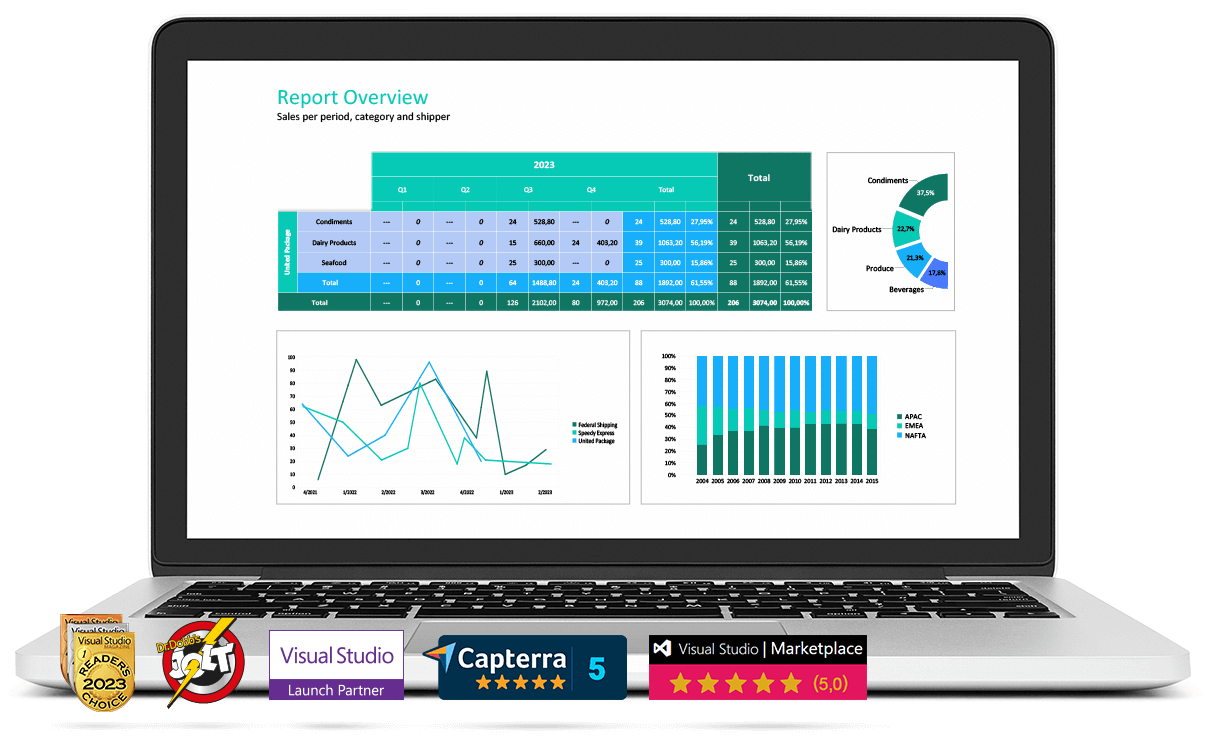
List & Label Adapts to Your Development Environment
The List & Label report generator extends your application with extensive and convenient print, export and preview functions. You remain independent of programming languages and database formats. You retain control over data transfer and create the interface.
How does the reporting Tool work?
Five Easy Steps to a Finished Report

Seamless Integration
into all major development environments and programming languages: Visual Studio, .NET/.NET Core (C#, VB.NET), C/C++, Delphi/VCL, Java, Progress, DataFlex, dBASE PLUS, Xbase++ and more.

Flexible Connection
of any data source thanks to data binding in .NET and data providers for all common SQL databases (MS SQL Server, Oracle, IBM Db2, …), file-based formats (XML, JSON, …) and much more.

Professional Design
with charts, tables, crosstabs, forms, barcodes and gauges: the right visualization for every type of analysis is placed at the disposal of your users.

Interactive Preview
with a wealth of functions for interactive embedded reporting: drilldown, expandable areas, animations, sorting and dynamic data filtering via report parameters.

Print and Output
via a wide range of export options (including PDF, DOCX, XLSX, PPTX, XHTML, CSV, RTF, XML, JSON, SVG, PNG) with convenient distribution via e-mail or upload.
What does the reporting TOOL include?
Reporting for Desktop, Web and Cloud Applications
In addition to a powerful reporting engine, List & Label contains all of the reporting components and options you need for embedded reporting:

Unlimited design options for attractive, user-defined analyses, dashboards, invoices, forms and labels
Report Designer for desktop and web – fully customizable for users with WYSIWYG convenience plus office look & feel for intuitive use
Report Server as an out-of-the-box web solution for cross-platform reporting on Windows, Linux, macOS, Android and iOS clients
Barcode object with more than 50 license-free barcode formats – no barcode fonts required | more about creating barcodes with List & Label
More than 30 data providers are included which can be extended as desired with your own providers
Comprehensive document object model (DOM) for code-based generation of reports
Why Developers Love List & Label
Design Inspiring Reports
Find out how List & Label can contribute to the growth of your company and which advantages our report generator offers you.
Added Value for Users
“In the past, customers weren’t able to change the design. Then we introduced List & Label and were able to sell twice as many software licenses in the same month.” Alexander Kollin, Managing Director of KingBill
Always Up-to-Date
For more than 30 years, List & Label has supported the latest versions of development environments and frameworks. Take advantage of our industry-leading expertise.
.NET Reporting Made Easy
Integrate List & Label in .NET or .NET Core with just a few lines of code. Find out more on our website .NET Reporting.
Massive Time Savings
“Thanks to List & Label, we’re now able to offer our customers much more complex reports and documents than before, and implement them on average 50% faster.”
Alex Singer, IT developer and Proprietor, WebDatabases
Support From and For Developers
Get fast, competent support from our development department. We also offer practical Designer training courses and intensive workshops.
No License Fees
Distribute List & Label to your customers free of charge, including the Designer and the Report Server with all available features.
Would You Like to Learn More About Our Reporting Tool?

Development
How can I integrate List & Label?
Discover the possibilities – check out our tutorial and programming examples.

Report Designer
Which functions are offered by the List & Label Designer? We’ll guide you through the Report Designer, step by step, and show you the advantages.

Web & Cloud Reporting
Are you developing a web application?
Discover the web controls in List & Label, or start right away with the Report Server.
Test the Fully Functional Trial Version for 30 Days Free of Charge.
List & Label Customers
Awards and Accolades
Synergy Partners & Collaborations
News

Press Release:
combit Releases List & Label 29

List & Label Newsletter
Don’t miss out on new features, service packs, how-tos and exclusiv sales offers.
Get Started with Our Blog Posts and White Papers



What Our Customers Have to Say About List & Label
Have a look at a few customer quotes:
5/5
We are very satisfied with List & Label. For us it is the best reporting tool available. We use it for almost every software solution we are offering.
Fabio Nocentini, Florinfo Snc, Italy
5/5
I am very satisfied with List & Label. After a short training period, I already get along very well with the designer. Programming is also no problem thanks to the good documentation. Overall, I am very satisfied, in numbers I would say 9 out of 10. I also find it super and not a matter of course to seek contact with the customer.
Deisböck IT Solutions GmbH, Matthias Deisböck
5/5 List & Label is the best thing since sliced bread. I started using LL in version 8 and I just simply love it. Michael Cooper, Grasp Software Corporation, Canada
5/5 List & Label is extraordinarily complete. I find that whatever I need to do, there’s almost always a way to do it. Erik Muench, CAMI Research Inc., USA
5/5
Using ListLabel our customers and consultants have a means to design their own reports through the web application.
Vincent van der Tol, Condor B.V. , Netherlands
FAQ
Into which development environments can the reporting tool be integrated?
We provide special components for .NET and VCL for easy integration. Our .NET Tutorial shows you how to integrate List & Label into your application. We also provide you with a few programming examples. Of course you can also integrate our reporting tool into all DLL/API compatible languages. Contact us if you need more information about a specific programming language.
How can I link data sources to the report generator in .NET?
You can freely choose your preferred data access. For example, you can choose from amongst ADO.NET objects (e.g. DataSet, DataView), business objects, ORM data (e.g. Entity Framework), LINQ data or any enumerations. We also offer additional data providers for various SQL and NoSQL databases such as Microsoft SQL, PostgreSQL, MySQL, Oracle, DB2, MongoDB etc. Furthermore, any data source that comes with an OLE DB or ODBC driver can be used as a data source with our reporting tool. Relationships between tables are automatically analyzed and transferred. If you need more customization options, you can simply implement your own data provider. If you need support, we’re happy to help. Contact us for further information.
Can I use List & Label with desktop, cloud and web applications?
No problem! You can create both types of applications with List & Label. The reporting tool offers extensive options for making the functions associated with desktop applications available in web applications too with the help of the Web Report Designer, the Ad-hoc Designer, our HTML5 viewer and the ready-to-use Report Server.
Can I test List & label for free?
Yes, there’s no catch. Beside the free, fully functional 30 day trial, we offer a satisfaction guarantee in form of a 100 day money-back policy, valid from date of purchase. For reimbursement, all we need is a written non-use and deinstallation confirmation.





 Deutsch